The headline of the article I've linked below is spot-on. Security isn't about measures taken by the operating system any longer, it's about measures taken by users themselves.
For instance, as an IT professional with a good knowledge of computer security practices, if I wanted to I could work every day with Windows and remain malware-free just by being conscientious about what I do with the computer. Windows is certainly an unstable house of cards in that regard, but if you know how to use it you can be just as safe as anyone else, even without anti-malware software installed.
Even OS X has recently had an outbreak of malware, but it requires unwary users to install unverified software in order to infect machines. I still maintain that it requires a much less watchful eye on system processes to keep a Mac clean, but it is by no means immune.
However, I do take issue with the final paragraphs of the linked article. It's true that Microsoft is still the biggest target, and that very fact makes exploitation more lucrative and therefore more likely to be attempted. However, the underpinnings of the operating system still rely on legacy code with a much more relaxed security model. The Unix architecture on which OS X is based is by far a much more stable design.
Windows isn't attacked day and night merely because it's got larger market share; while that's a contributing factor, it's also got many more exploitable attack vectors. And, as John Gruber has pointed out in the past, OS X isn't "utterly impervious to attack because it’s protected by magic leprechauns." It's just better.
But, to reiterate the main point here, either one is only as secure as its users, who have to be quite a bit more fastidious if they've got a Windows machine on their desk.
When it comes to security, it's the user, not the OS | Macworld
Thursday, June 3
Security: Not the fault of the OS anymore
Tuesday, April 6
640 ought to be enough for anybody
And now, back to your regularly scheduled programming: today's Wondermark is fabulous.
And in regard to that title... this is post 640 to this blog, in nearly 6 years. Check here for the "source" of my (mis-)quotation.
Sunday, February 28
Geek code - why do I do this, again?
So, it was pointed out to me today that my current Geek Code, shown at the bottom of every page of this blog, is significantly out of date. As I always mention when publishing these updates, version 3.12 of the Code was formulated in 1996, so my available options for the various categories aren't particularly reflective of how things really work in the world these days.
In any case, here's my new Code:
-----BEGIN GEEK CODE BLOCK-----
Version: 3.12
GIT/MU d+@ s:+>: a->+++ C++> ULXB++++$ L+++ M++ w--() !O !V P++ E--- W+++
N o++ K? PS PE+ Y+ PGP++ t !5 X- R- tv+@ b++ DI++++ D--- G++ e*++ h r? y?
------END GEEK CODE BLOCK------
If you really care about knowing what that all means, you either know the code already, or you can get it decoded for you here.
Friday, February 19
More amazingness from Andy Ihnatko
From a recent interview Andy gave to the Tactical Pants Blog:
If you could rename the iPad, what would you call it? Why?
I have no problems with the name. But if I were to rename it, I’d probably go with “Severe Eye Injury” or maybe “Adorable Baby Ducks In Horrible Imminent Danger.” It would be Apple’s ultimate statement of confidence: “Our new tablet computer is so handy and useful that you won’t give a damn _what_ it’s called.”
As usual, he lives up to his signature wit throughout, but this answer exemplifies precisely why I read everything that ever comes out of this man's head and onto a computer screen.
Andy Ihnatko on His Tactical Internet Pants and Apple's iPad | Tactical Pants Blog
Thursday, November 19
On Predictability
I've been thinking a bit lately, and I've come up with this maxim:
Anything predictable is exploitable.
I'm going to confine this to network traffic at this point, since it's the only application for which I've given this much thought, but I'm willing to bet that it holds true in other areas as well.
Keep in mind that exploitability is not, in itself, a bad thing. A Web browser predicts that an http:// server is running on port 80 and exploits that. With that assumption, most people won't have to know what the previous sentence even means. Sometimes you run across sites where you have to enter "dummydomain.net:8080" in your address bar for servers that aren't using port 80 for Web traffic, but the ability to assume and predict a standard port is good.
On the other hand, exploitation can be bad. In old TCP stacks, the sequence numbers always started with 1 and incremented from there. This ability to predict traffic and forge legitimate responses can allow malicious machines to hijack sessions through what's called a "man-in-the-middle attack." More modern implementations of TCP/IP start the sequence number randomly; this prevents prediction and exploitation.
There are many steps in a chain at which predictability can lead to exploitability when it comes to network security, and not all of them are even technological. Take, for instance, the predictability that some percentage of users will click the link in a spam email message. Given that mass amounts of email can be sent at virtually no charge, and there is always some small percentage that will respond positively, there is still a return on investment that makes spam campaigns profitable. [0]
The same thing applies to cryptography. The only way to have a message encrypted well enough in transit to prevent decryption is to create ciphertext that is as close to pattern-free true randomness as possible. If there's any way to detect patterns, and therefore create predictability, exploitation will soon follow.
I can go on, but I think I'll stop here for now. I think, however, that the ability for prediction to beget exploitation is the driving force behind security these days (not limited to computer security). For instance, it's the regulated unpredictability of financial systems like the stock market that keeps people from reliably exploiting them for their own gain!
I might have more thoughts later, but I just wanted to put this out there while it was on my mind.
[0] "Spamalytics: An Empirical Analysis of Spam Marketing Conversion." Chris Kanich, Christian Kreibich, Kirill Levchenko, Brandon Enright, Geoffrey M. Voelker, Vern Paxson, and Stefan Savage. Communications of the Association for Computing Machinery 52(9):99-107, September 2009.
Tuesday, November 17
Genius!
This is an awesome quote from one of my favorite tech columnists. It's the final line in the linked article.
Remember that to Google, the millions of people who use the Internet are like one big immense sofa with thousands of cushions. It’s always rummaging through our user experiences and finding loose change that we never knew we lost and never miss once it’s been taken.
Friday, July 3
iPhone 3.0 (3GS) Voice Control problems
OK, so I really like the new iPhone. However, its Voice Control feature is really not up to snuff.
Firstly, if I want to dial the phone by voice, I have to take the phone out of my pocket and speak into it—even if I've got a Bluetooth headset connected. My old RAZR let me voice dial into the headset by pressing the button; why won't the iPhone? The headset button just makes the iPhone redial your last outgoing number, and only if you hold it down for a couple of seconds.
Secondly, if I have a playlist containing only podcast episodes, Voice Control won't play it. Apparently Voice Control will only play songs for some reason. I've got multiple podcast playlists (one for the short daily ones that I want to listen to first, and another for the other longer ones that come out less frequently), so when I want to switch between them I have to glance down at the screen.
Thirdly, and probably most important to me, there's no way to use Voice Control to start a playlist in shuffle mode—which, once my podcasts are finished, is exactly what I want to do. I have to start a playlist, then separately issue a "shuffle" voice command or shake the phone (if 'shake to shuffle' is enabled). While this could a serviceable enough option, it adds one to the Skip Count of the first item in the playlist! I haven't skipped the song; I just wanted to start the playlist in shuffle mode. This throws off my smart playlists, some of which use Skip Count and Last Skipped Time to determine which songs should be included.
The worst part of this two-steps-to-shuffle bit, however, is how long it takes—especially while I'm driving the car. I should be able to issue a single voice command, not go through the whole rigmarole twice just to end up how I want it. Not to mention that it takes nearly 3 seconds of holding the button down just to start Voice Control each time, and then it may or may not understand my command properly the first time anyway.
Actually, in the process of writing this post, I discovered way to get a playlist going in shuffle mode without incrementing any songs' Skip Counts, but it takes three steps! First, issue the Voice command "shuffle", then it says "no music is playing; do you want to play music now?" So then you have to wait for the beep and say "yes," which starts playing your whole library in shuffle mode. Then you can start Voice Control again and tell it to play a particular playlist, which will then start in shuffle mode.
Apple, please think of the people who are using your products in the car! Make it simple to place calls and initiate shuffled playlists without looking at the device! There's a "shuffle" button at the top of every playlist in the visual interface; shouldn't that be an option in the spoken interface as well?
I realize that, at iPhone OS 3.0's introduction, they said that Voice Control wasn't totally complete. However, its inclusion at all was one of the big things that convinced me to finally get one, so I'm a bit disappointed that it was added on without the usual polish of most Apple products.
Wednesday, May 27
Hudzee - Hard Drive storage

I just found out about a new hard drive storage case which is actually pretty neat. Most technology enthusiasts and computer professionals have at least a few hard drives just sitting around, full of old data which we're not quite willing to discard just yet. Or maybe it's a new drive you just picked up cheap at a swap meet or rummage sale.
Sure, you can put these bare drives into anti-static bags, but that can get clumsy. It's hard to store a bunch of bagged drives, and it's even harder to figure out what's on each one.
The Hudzee helps you safely store and organize your drives. It's a plastic case with a bit of padding on the inside to keep the drive's delicate components from getting scuffed or scratched. For anyone who regularly deals with hard drives—whether it's storing spares in case of failure, archiving old data, or for transporting large amounts of data via "sneakernet"—these cases are very cool.
I recently ordered a few, and I'm really impressed with how well the drive mechanisms are protected. They're cushioned, but still given plenty of room inside the case to breathe. There's also a window on the outside of the case for labeling, so you can remind yourself of the drive's contents or purpose when it's sitting on the shelf.
I definitely recommend the Hudzee drive case. It's an easy way to keep your data protected, secure, and easy to organize.
$8 each ($65 for 10).
HUDZEE - Keep Your Internal Drives Under Control
(via The Adventures of Systems Boy!)
Thursday, April 9
My (brief) adventures with AppleTV
So I bought an AppleTV yesterday. I had been advised against it by two different people, especially since my primary intended use was going to be for playing videos from Hulu through the Boxee plugin. I'd been told that the Flash video playback on the device was no good, and both of the people to whom I spoke had either uninstalled Boxee or gotten rid of the device altogether.
However, I'm stubborn, and I figured my standards couldn't be too demanding. Hulu on my iMac looks awesome, even through Boxee, so how much worse could the AppleTV be? I still watch cable and DVDs through the coaxial input on my TV, after all! Also, my TV is a 4:3 CRT, and I haven't even been exposed to the fancy-schmancy High Definition stuff that's all the rave these days. I just wanted to see it for myself, so I went to the Apple Store after work yesterday and picked up a 40GB ATV.
I thought that my set, with its HD component video inputs, was capable of displaying 720p HD— but apparently it isn't. I had to settle for standard-def 480i output from the device, which was the first disappointment of the evening. I set the machine to sync with my iMac's iTunes library, then I sat down to eat dinner with my wife (who was finally discharged from the hospital yesterday! hopefully she stays well for a while this time).
After I finished cleaning up from dinner and loading the dishwasher, all of the lights in the house suddenly turned off. They flickered back on briefly, but soon the house was dark. Thankfully, it wasn't yet 7pm, and Daylight Saving Time meant that there was still enough light coming through the windows that we weren't entirely enshrouded. My AppleTV adventure was cut short, though. I turned on my (battery-powered) EeePC in order to look online for the power company's phone number, only to realize that the outage had also turned off my modem and router. I ended up using Google's 800-GOOG-411 service to get ahold of them anyway, and was told that it was a known outage that should be resolved by 7:46pm.
Around 7:30, the lights came back on. I turned the AppleTV back on and resumed the iTunes sync. I let the AppleTV play the latest episode of the FLOSS Weekly podcast while it finished syncing and I surfed the Web on my netbook. This was the best use of the device I'd had yet... the ability to listen to podcasts & surf the Web while downstairs in the living room and not holed up in front of the iMac in my home office.
After the sync was finished, the AppleTV wanted to update itself to the latest Apple firmware, which I allowed it to do. Then I created the USB patchstick with my SanDisk thumb drive so I could hack the box and install Boxee. It installed and ran just fine, so I fired up Hulu. The video there was incredibly choppy. It got better when I turned off the 480p high-resolution stream in my Hulu account and restarted the stream of Monday's episode of Chuck, but it still wasn't smooth. This was very frustrating, and the Boxee CBS player had the same problem. Oddly, the Comedy Central player was better, but still not great.
Boxee was awesome when I set it up to play video files over the network from my Mac. I had a House episode I'd downloaded recently since my cable box's DVR cut off the end of the show, and the XviD file played great streaming through Boxee.
However, my main attempted use for the AppleTV was going to be a replacement for cable, watching all the shows I like with Hulu and through Apple's iTunes Store. I wanted to make sure I got all my video legitimately, through paid or ad-supported Internet means, and not have to resort to downloading all my shows from the shadier corners of the Internet. Since Hulu wasn't satisfactory as a cable replacement (and Big Bang Theory doesn't have any legal Internet distribution, anyway), I restored the device to its factory settings and put it back in the box to return it to the Apple Store.
It made for an enjoyable evening of hacking around (I even enabled ssh access to the AppleTV, which was pretty fun just for the hack value), but it's just not viable as a replacement for cable. I'll probably need a full-scale Mac mini for that, but if I'm going to run full-on OS X I don't want to be using a CRT with overscan, anyway. I'll wait until I can afford both a mini and a new flat-panel TV with HDMI input, which probably won't be for a while.
Tuesday, March 17
Apple's new anouncement
First off... this is probably the very first Apple announcement in at least four years that I didn't know about in advance. Seriously, the first time I heard about Tuesday's press event was in the NYT article linked below. I feel this is my first step toward becoming a "cranky geek."
In any case, I've finally been thinking more about getting an iPhone, and this new wave of features (and the speculated cheaper new hardware in the summer) is making it ever more attractive.
The oddest thing to me about this report, though, is the description of their new "pay for program enhancements" feature in the App Store. When I read this, my first reaction was to think, "Cool! People can now offer free trial apps and then charge for an upgrade to the full version, like Mac apps have done for years!" However, they've explicitly stated that any app offered originally for free can't have any paid add-ons, so this model won't be available. If developers want to offer trial software, they'll still have to put separate free and paid apps into the Store.
I also hear that they're upgrading the synchronization of personal information from the Internet to the device in the form of direct CalDAV support. Sounds cool; I'm officially considering this seriously now.
Apple Shows Off Next Version of iPhone Software - Bits Blog - NYTimes.com
Friday, February 27
Geek Code update
Well, I haven't updated my Geek Code in about 18 months, so I was due for a refresh. Of course, everything is horribly dated since the code itself was last updated in 1996, but here's where I am today:
-----BEGIN GEEK CODE BLOCK-----
Version: 3.12
GIT/MU d+() s:+>: a->+++ C++> ULXB++++$ L++ M++ w--() !O !V P++ E--- W++ N
o++ K? PS PE+ Y+ PGP- t !5 X- R tv+ b++ DI++ D--- G++ e*++ h--- r+++ y+++?
------END GEEK CODE BLOCK------
(my geek code decoded)
Thursday, January 8
Windows is officially irrelevant
In a NYT piece this morning, Microsoft CEO Steve Ballmer argues that the upcoming "Windows 7" will be important. However, this paragraph from the article just made me laugh:
He added, however, that Windows 7 should not have the same sort of problems with compatibility with devices and programs that Vista did. While some of underlying architecture of Vista changed from earlier versions of Windows, Windows 7 is built on Vista’s underlying structure.
That means that users upgrading from Vista to Windows 7 won't experience any problems. However, anyone that didn't upgrade to Vista because of the compatibility problems will still face the exact same roadblocks if they try to use Windows 7.
He's assuming that all his customers are using the latest version and just might just have had some problems getting it to work. But in my lab, I still have all the workstations running Windows XP. I was hoping the next version of Windows would respond to criticism from the cautious and provide a cleaner upgrade path from XP, but based on this report of Ballmer's CES keynote I'm no longer optimistic.
Thankfully, our use of XP is just a fallback measure for a few pieces of software that aren't cross-platform; Linux is our main operating system and will continue to be for the foreseeable future.
Ballmer: Windows Is Still Relevant - Bits Blog - NYTimes.com
Tuesday, June 10
Shiny New Toy
Recently the Netflix DVD-rentals-by-mail service introduced a new product, a set-top box that lets you stream movies from the Internet directly to your television.
They've had the "Instant View" capability for quite a while now, but you needed to watch the movies on a Windows PC. Now, though, they've teamed up with media-device company Roku to produce the Netflix Player to put those movies from the Internet onto your TV screen.
When I first heard about the Player, it seemed interesting, but I doubted that it would be worth it in my home. First of all, my wife and I cancelled our Netflix subscription back in 2005 after only about three months with the service. While it's a great service, we found ourselves feeling that we had to watch the DVDs as soon as possible and send them back for new ones so that we were getting our money's worth. Those red envelopes consumed nearly all of the free time we had (especially since we were on the plan that let us have three movies at a time).
However, I read a blog post by a fellow member of the local Linux Users' Group that changed my mind. He wrote about opening and setting up the machine, and I was really intrigued; especially by the mention of the television shows that were available for viewing with this method.
I looked around on the Netflix site to see how the pricing works, and it turns out that even the $9/month plan allows for unlimited Instant Viewing on the device (the plan includes one DVD in your home at a time). Well, that's barely more than the price of two Blockbuster rentals. Regardless of whether we went through the physical DVDs quickly, we could definitely get a good bang for our subscription buck with the Netflix Player. Granted, the device itslef costs $100, but we hadn't put any of our tax rebate into the US economy yet...
So I restarted our Netflix subscription a couple of weeks ago and ordered the Player. It was delivered by FedEx last Friday, and I've been really impressed by it. The only difficult part was entering the 64-character randomly-generated strong password for our wireless network on the little 9-button remote control. However, the onscreen keyboard was versatile enough to provide all the characters I needed, and the box downloaded my Instant Queue list immediately and was ready to start playing movies.
You have to choose the movies for your Instant Queue list by visiting the Netflix website on a computer, and then your only options on the Player itself are to change a few settings or play one of the movies you've pre-selected online. Most of the titles available are fairly old, though there are some newer movies. In a really cool twist, some recently-aired NBC shows (Heroes, 30 Rock, The Office) are already available for Instant Viewing. If more television gets added to the list in such a timely manner, we might even be able to cancel cable.
All in all, this is a great device that I recommend to anyone with a decently-fast Internet connection. Check it out!
Saturday, May 17
The rise and (please, come quicky) fall of Microsoft
It's obvious that Microsoft won't be a big technology market force forever, and here's a great piece from the New York Times detailing their inevitable (and, in some senses, current) state of decline.
The Computer Industry Comes With Built-In Term Limits - New York Times
Monday, February 18

Sunday, February 17
Tuesday, January 1
OS Virtualization on a Mac: Parallels vs. VMWare
Now that Apple's computers use Intel processors like the rest of the desktop computing world, it's become easy for Mac users to run other operating systems in tandem with OS X. Sure, PowerPC Macs can dual-boot certain Linux distributions that distribute a compatible version, but a lot of Linux software packages are written only for Intel's x86 platform.
With the change in processor architecture, a Mac can run all the mainstream desktop operating systems... including Windows, if you want. In fact, you no longer even have to reboot the computer to switch the running OS; virtualization software is now available to let you boot a virtual "guest" system within your OS X "host."
The two competing commercial programs for virtualization within OS X are Parallels Desktop and VMWare Fusion. (There are a few free-software alternatives, but I haven't successfully used any of them.) It seems that VMWare and Parallels are both very good at what they do, and they seem to be playing a constant game of leapfrog such that "who's better" is constantly switching sides.
It was really hard to make a distinction between the two, but after reading an intense comparison on MacTech.com I discovered that:
- Parallels is a little bit faster than VMWare
- However, the faster the "host" Mac, the less speed difference there is between them
- VMWare is much better at virtualizing operating systems other than Windows (i.e. Linux)
Since I have a fast, recent Mac, and I plan to run a lot of Linux virtual machines, that clinched it for me. In fact, I ran into a poll on MacResearch.org that showed that people virtualizing Windows tend to go for Parallels those running Linux VMs tend to go for VMWare. Since my primary application will be Linux virtualization, I bought VMWare. I tested it before I bought it, and it's been running the latest version of Fedora (one of my favorite Linux distributions) just great. It also looks like I'll have plenty of cool features whenever I decide to start virtualizing Windows.
And, since I bought in 2007 (December 31, but it counts), it looks like I'll be able to take advantage of a $20 VMWare rebate as well. The website says it'll take a few days for my order to be fully processed and for my rebate eligibility to be verified, but it looks like it will go through.
Monday, December 10
Google Reader, again (UPDATED)
It's been a long time since I last tried using Google Reader to keep track of news and blogs. There have been a lot of new features added since then, so I'm going to give it a go once more.
I imported all my feeds in from Bloglines, and the first thing I noticed is that Reader still timestamps items by when it reads them, not by the post time given in the feed. Since Reader only goes out to check your feeds intermittently, you end up with "clumps" of items posted between checks that are all given the same date and time. There's a great post about why this is bad here.
This was one of the reasons it didn't work out for me last time; hopefully it either doesn't bother me this time or the behavior is fixed to work more intelligently. Anyway, here goes...
UPDATE: I've already seen that the behavior has indeed been fixed to work more intelligently. The issue raised in the post I linked to above has been resolved, keeping items in the correct order even when a group is all grabbed at the same time. However, it would still be nice to see items timestamped with the actual <pubDate> from the feed and not Google's "scrape time." The only other issue I had in previous Reader attempts was seeing how it treats feed items that have updated or changed. There doesn't seem to be a per-feed setting for whether to show the item again when there's a new version (there is in Bloglines, which is a feature I really liked), so I'm still not *quite* sure whether Reader will stick with me this time.
Google Reader
P.S. Mihai Parparita, this one's for you.
Thursday, December 6
Friday, November 30
xkcd... still great
This is from Monday, but despite being a few days old it's still pretty awesome. As usual, the punchline is actually in the mouseover text.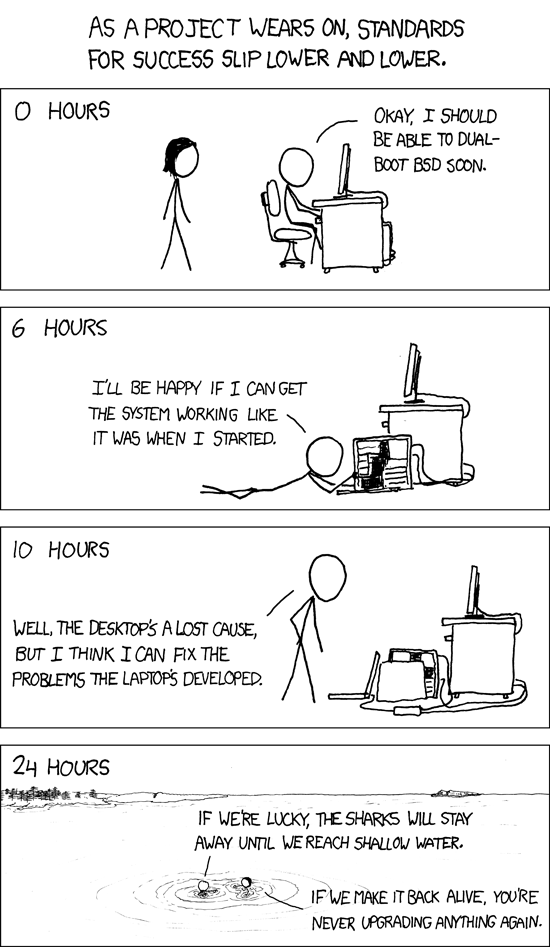
xkcd - Success

This work is licensed under a Creative Commons Attribution-
The Geek Code desperately needs updating, but in any case here's mine (as of 2010-02-28):
-----BEGIN GEEK CODE BLOCK-----
Version: 3.12
GIT/MU d+(-) s:+>: a C++> ULXB++++$ L+++ M++ w--() !O !V P+ E---
W+++ N o++ K? PS PE++ Y+ PGP t !5 X- R- tv+@ b++ DI++++ D--- e*++
h--- r+++ y+++ G+
------END GEEK CODE BLOCK------
If you really care about knowing what that all means, you either know the code already, or you can get it decoded for you here.